The app's pink area · 4 games

Coloring, drawing and piano games for kids

Brinquim's Draw & Play area is the free-form part of the app: color pictures, draw anything, build sticker scenes and play the piano with well-known songs. There's no score and no wrong answer here; the result is the drawing or the song itself, which your child can keep.

Coloring, Free Draw and Piano are free forever. Stickers is part of Premium and can be tried free for 5 minutes.

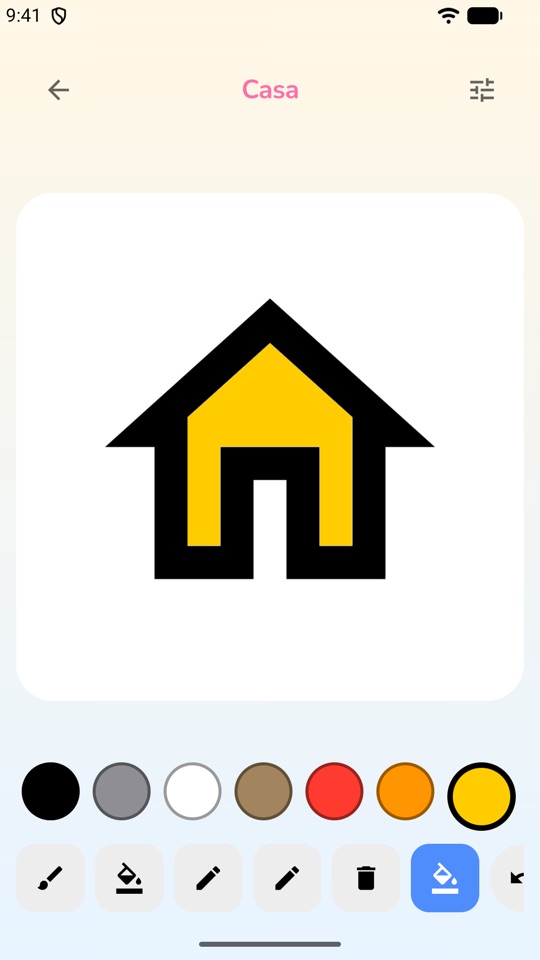
Brinquim coloring screen: a drawing of a house being painted yellow, with the color palette and tools below

The 4 creative games

They appear in pink on the home screen. Because they're toys rather than tests, they're left out of scoring and the daily challenge.

Coloring Free

Kids pick a picture and paint with brushes or the paint bucket, which fills a whole area at once without leaking past the lines. Tapping a painted area again recolors just that area. The page is always square, so the coloring stays in place even when the device rotates. New pictures can be traded for stars in the reward shop.

Practices: colors, fine motor control, focus

Free Draw Free

A blank page and the same drawing tools, with widths made for small fingers. No template and no rules: whatever your child makes is right.

Practices: expression, creativity, coordination

Stickers Premium · 5-min free try

A scene to fill with stickers, plus a pen for the bits no sticker covers. It opens straight onto a blank scene, with nothing to choose first, and the background can be changed from inside.

Practices: storytelling, composition, imagination

Piano Free

A 21-key keyboard of colored keys, with no black keys, where every note sounds nice. In Free Play kids just play, and can record and play back what they made. In Follow the Colors, a song lights up the keys one at a time and the child follows along; the Listen button plays the song first, with a slower-speed option. There are kids' songs such as Twinkle Twinkle Little Star, Happy Birthday, Row, Row, Row Your Boat and Old MacDonald, and a grown-up list with Für Elise and Tico-Tico no Fubá.

Practices: music, rhythm, memory, coordination
When your child wants a puzzle instead, see the logic and memory games and the letter and word games.

The "My Art" gallery

Everything your child saves goes to their profile's gallery. Drawings are never deleted automatically, because a drawing is a keepsake. To share or print a drawing, the app asks a grown-up to confirm: sending a file to another app is exactly what a small child shouldn't do alone. Deleting also asks first.

Left-handed mode and small hands

On drawing screens, left-handed mode moves the tool row to the other side so your child's hand doesn't cover what they're making. Only the buttons move; the artwork stays the same. Tools come in widths made for small fingers and colors sit on big buttons.

Tips for parents

  • Ask about the drawing. "Tell me what's happening here?" is worth more than "how pretty".
  • Print it and hang it up. From the gallery a grown-up can print the drawing so your child sees their work on the fridge.
  • Play together. On the Piano, one plays a song in Follow the Colors and the other sings. For kids who need more time, use Listen at the slower speed.
  • Use the stars. Stars earned in other games buy new pictures to color in the shop; stars can't be bought with money.

Designed with neurodivergent kids in mind

In the creative activities there's no wrong answer, no score and no clock. Your child decides when to start and stop, which keeps things calm. The piano has no bad-sounding notes, and key tones are separate from the app's sound effects, which can be turned off in settings.

Brinquim is an educational games app, not a treatment. It is not a medical device and does not replace therapy or care from health and education professionals. If your child works with a care team, tell them about the app: they can suggest which games fit your child's goals.

Frequently asked questions

Is the coloring game free?

Yes. Coloring, Free Draw and Piano are among Brinquim's 8 games that are free forever. Stickers is part of Premium and can be tried free for 5 minutes. There are no ads.

Can drawings be printed?

Yes. Saved drawings stay in the child's profile gallery and can be shared or printed after a grown-up confirms.

Does my child need to know how to play piano?

No. In Follow the Colors the keys light up in the song's order and the child just follows the colors. In Free Play any combination of keys sounds nice.

Try it with your child

28 games, 8 free forever, no ads and no sign-up. Your child's data stays on the device.

Other areas of the app: