The app's green area · 8 games

Number and math games for kids

In Brinquim's Numbers & Math area, kids count objects, compare amounts, do sums, learn to read a clock and practice writing numbers. The question is always spoken aloud, so kids can play before they can read.

Numbers is free forever. The other 7 are part of Premium, and each can be tried free for 5 minutes.

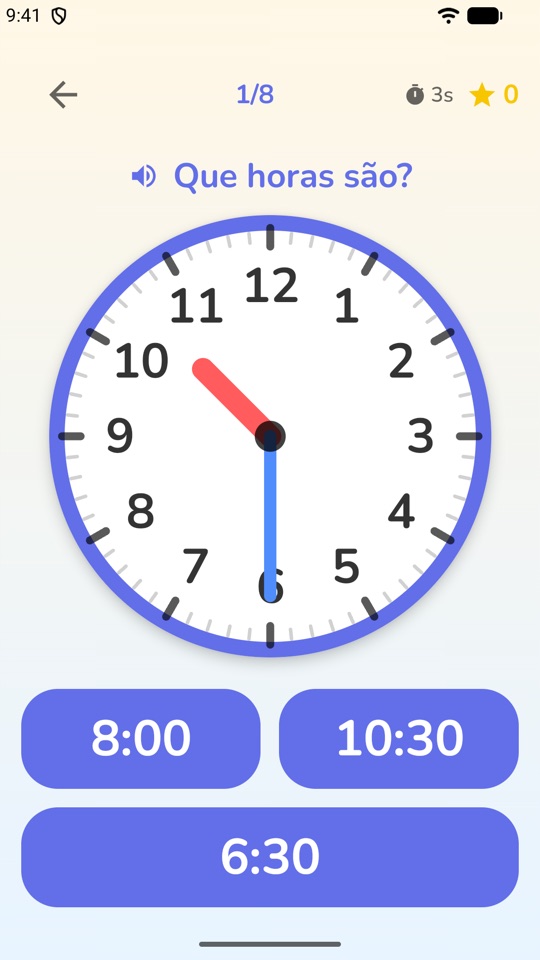
Brinquim Clock game screen: an analog clock asking What time is it? with three digital time choices

The 8 number games

The games appear in green on the home screen, in order: from the gentlest, which a 3-year-old can play, up to sums with multiplication and division.

Numbers Free

A group of objects appears with a row of numbers to choose from. The question "How many?" is spoken, so kids know what to do without reading. For older kids, two groups appear with a plus sign, and counting turns into a first sum.

Practices: counting, matching numbers to amounts, first sums

Quick Count Premium · 5-min free try

A few dots flash and hide; the child says how many there were. A wrong answer shows the same dots again for another look, instead of moving on. Three levels: a few dots, more dots and lots of dots.

Practices: recognizing amounts at a glance, attention

Compare Premium · 5-min free try

Two numbers side by side and a question that alternates between "which is bigger?" and "which is smaller?". Because the question changes, kids have to listen before tapping.

Practices: bigger and smaller, number order, listening

Heavy & Light Premium · 5-min free try

Real-world comparisons: "which is heavier?" with two things on a seesaw, or "which is bigger?" with two or three side by side. After a right answer the seesaw tips toward the heavy side (or the things grow to their true relative size), so the child sees why.

Practices: weight and size, comparison, measurement words

Math Premium · 5-min free try

A sum and three answers to choose from. The basic level has plus and minus; medium adds multiplication; the top level has multiplication and division. Kids pick their own level, so anyone who wants a bigger challenge can reach for it, and the app keeps tuning the numbers as they go.

Practices: addition, subtraction, multiplication and division

Math Maze Premium · 5-min free try

A grid of numbers. The current cell pulses and the prompt appears, for example "6 + 2 = ?"; the child taps the neighbouring cell with the answer and moves through the maze skip-counting by 2s, 3s and so on. At each step only one neighbour is right, so there's never any doubt.

Practices: skip-counting, mental math

Clock Premium · 5-min free try

Three kinds of round take turns: read an analog clock and tap the matching digital time, hear a time and tap the clock that shows it, and, at the top level, drag the hands to a time. The hour hand is always the same color, which becomes a hint: "the short red one says the hour".

Practices: telling time, analog and digital clocks

Write It Premium · 5-min free try

Trace numbers and shapes with a finger. As in Letters, an optional guide shows where each stroke starts and the right order (a 4, for example, is two strokes), and any attempt over the model counts.

Practices: writing numbers, fine motor control

Want letters too? See the letter and word games. For logic and focus, see the logic and memory games.

Difficulty that follows your child

The number games use Brinquim's three age levels: up to 4, 5 and 6 and up. Within each level the app watches how your child is doing and adjusts on its own: if it's too easy, the numbers grow; if it's hard, they step back. The app remembers each child's sweet spot in each game, so siblings on the same device don't mix up each other's progress.

A wrong answer never costs points. In several games a mistake becomes another chance: in Quick Count the dots show again; in Clock and Heavy & Light the child just tries another option. Stars are saved the moment they're earned.

Tips to bring math into everyday life

The games work best when your child meets the same numbers off the screen:

  • Count real things. Stairs, fruit in the bowl, cars of the same color on the street.
  • Ask the time. After playing Clock, ask how long until lunch or bath time, looking at an analog clock.
  • Compare real weights. Hold a book and a sheet of paper: which is heavier? It's the same reasoning as Heavy & Light.
  • Let your child pick the Math level. They can move up when they feel ready; the app keeps tuning underneath.
  • Follow along without pressure. The progress report, in the parent area, shows minutes played and what your child practiced most.

Designed with neurodivergent kids in mind

The number games follow the same care as the whole app: spoken questions, few choices on screen at the beginner level, big buttons for small hands, colors chosen to work for color-blind kids too, and no timer that makes a child lose. There are no ads and no pop-ups in the middle of a game.

Brinquim is an educational games app, not a treatment. It is not a medical device and does not replace therapy or care from health and education professionals. If your child works with a care team, tell them about the app: they can suggest which games fit your child's goals.

Frequently asked questions

What age are the math games for?

Brinquim is for ages 3 to 14. Younger kids start with Numbers and Compare, which only ask them to count and choose; Math goes up to multiplication and division at the top level. Difficulty adjusts itself as your child plays.

What happens when a child gets it wrong?

Nothing bad: a soft sound plays and they try again. No points are lost and there is no game over. In Quick Count, the same dots show again for another look.

Are the number games free?

Numbers is free forever. The other seven are part of Brinquim Premium, an optional monthly subscription, and each can be tried free for 5 minutes on the device. There are no ads.

Try it with your child

28 games, 8 free forever, no ads and no sign-up. Your child's data stays on the device.

Other areas of the app: